
IMERGE PRO
RAW görüntü düzenleme motoru
Imerge Pro, fotoğrafçılığınızdan en iyi sonucu alan güçlü bir RAW motoruna sahiptir. Ayıracak vaktiniz yok mu? Sakın korkmayın. Imerge Pro’nun esnek RAW motoru özel olarak oluşturulmuş ve GPU ile hızlandırılmış olduğundan, herhangi bir RAW dosyasını içe aktarırken size ışık hızında bir güç sağlar.
- RAW işleme
- RAW görüntü düzeltme
- Benzersiz ve kullanışlı ana ekran
- Proje şablonları veya özel kurulum
- Renk derinliği – 16-bit float color
- Katmanları ve görüntüleri gruplama
- Sezgisel araçlar
- İkinci monitörde ön izleme
- Import formatları:
- Standard formatlar:JPEG, PNG.
- Yüksek kaliteli formatlar:TIFF, RAW.
- Uzman formatları:EXR (single-layer RGBA), HDR & PSD (flattened).
- Görüntü şablonları
- Export formats: JPEG, TIFF, PNG. Ayrıca Photoshop ya da HitFilm Pro’da katmanlarla açılabilen PSD/PSB ve HitFilm Composite Shot.
- Support metadata: EXIF, XMP & IPTC.

Toplu İşlem
- Layer content
- Multiple outputs
- Content variations
- Hot folders
Yerleşik Keyleme Efektleri
Chroma Key | Color Difference Key |
Color Match Background | Light Wrap |
Luminance Key | Matte Cleaner |
Spill Removal | Remove Color Matting |
Remove Stock Background |
Akıllı Maskeleme
Maskeleme, bir katmanın hangi bölümlerinin görünür olduğunu belirlemek için kullanılan bir kaplamayı manuel olarak oluşturmak için kullanılır. Pratik olarak bu, maskelerin katmanlarınızda kesilmiş alanlar oluşturmak için kullanılabileceği anlamına gelir, ancak hepsi bu kadar değil – aynı zamanda bir filtrenin nerede uygulanacağını tanımlamak için de kullanılabilir! Sadece gözlerin etrafını maskeleyin veya bir manzarada hızlı ve kolay bir şekilde gökyüzünün pozlamasını değiştirin.
Imerge Pro’da 5 tür maske bulunmaktadır:
- Gradient
- Area
- Vector
- Image Luminance (intelligent)
- Image Color Selection (intelligent)
- Brush Mask

Yaratıcı Filtreler ve Efektler
Black & White | Bleach Bypass | Channel Viewer |
Chromatic Aberration | Clarity | Clip and Knockout Blend Modes |
Clone Stamp | Clouds | Color Adjustment |
Color Overlay | Colorize Black and White | Curves |
Dehaze | Directional Blur | Displacement |
Dynamic Contrast | Exposure | Focus Stacking |
Gaussian Blur | Glow | Gradient Map |
Grain | Halftone | HDR Merge |
Healing Brush | Highpass | Hue Colorize |
Inner Glow | Invert | Keystone Correction |
Lens Distortion | Levels | Leave Color |
Lens Blur | Light Rays | Light Wrap |
Linear Gradient | Long Shadow | LUT (look-up table) |
Magnify | Matte Cleaner | Multi-Point Gradient |
Noise | Outer Glow | Outline |
Pattern Overlay | Pixelate | Quad Warp |
Radial Gradient | Remove Color Matting | Rotational Motion Blur |
Saturation Editor | Scan Lines | Sharpen |
Split Toning | Straighten Tool | Surface Blur |
Threshold | Tone Coloring | Vignette |
White Balance | Zoom Blur |

Minimum Sistem Gereksinimleri
HitFilm Pro, çok çekirdekli işlemci ve en modern GPU’ların gücünü kullanarak daha performanslı ve hızlı çalışır.
Apple: macOS 10.15 Catalina, macOS 10.14 Mojave, 10.13 High Sierra.
Windows: Microsoft Windows 10 (64-bit), Microsoft Windows 8 (64-bit)
Internet bağlantısı: Online aktivasyon için gereklidir.
İşlemci: Intel® i3, i5 veya i7 işlemci veya eşdeğeri AMD işlemci.
RAM:4GB (8 GB tavsiye edilir)
Ekran kartı: 24MP projelere kadar 2GB, 24MP üzeri projeler için 4GB+ grafik hafızası.
Windows:
Intel HD Graphics 4000 (GT2)(2012)
NVIDIA GeForce 600 Series(2012)
AMD R7 Series(2013)
Apple: 2012 sonrası kartlar
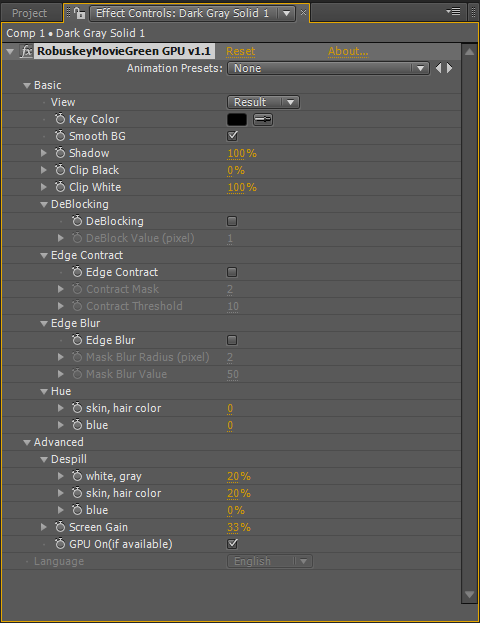
ROBUSKEY – Profesyonel Chromakey plugini
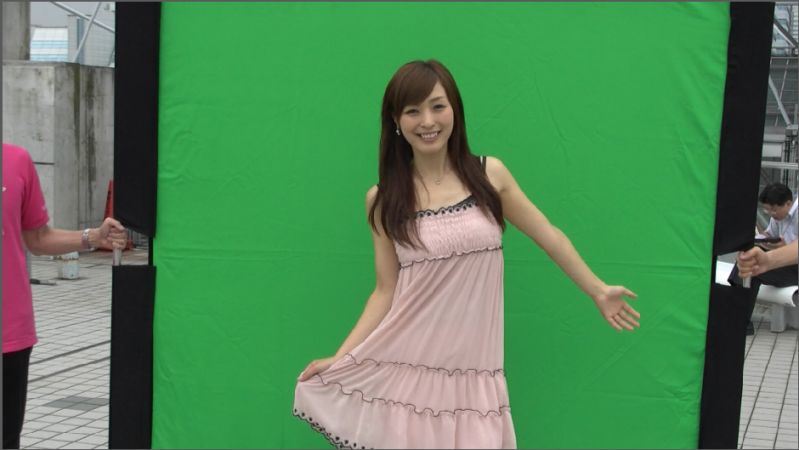
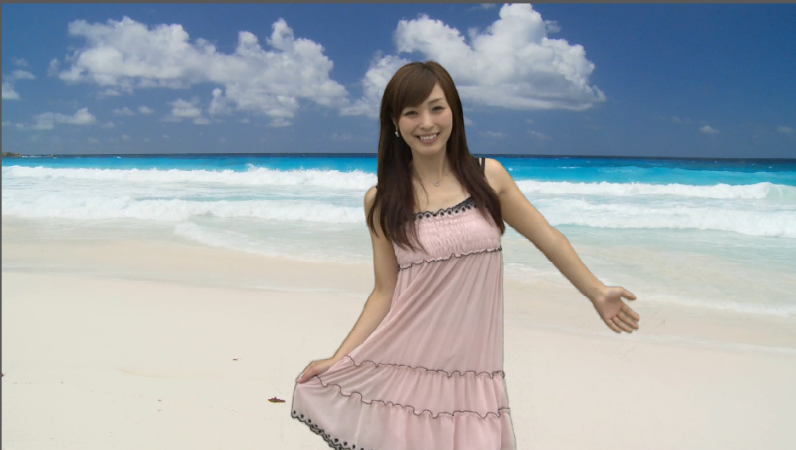
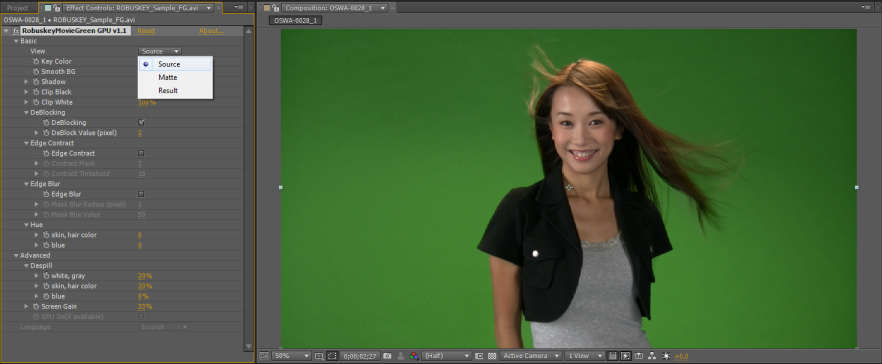
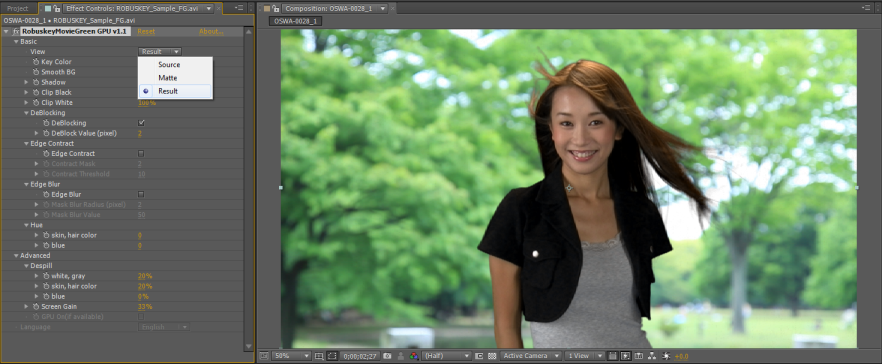
ROBUSKEY, üst sınıf bir Chroma key eklentisidir. Özel olarak insanların saç özelliklerine ve cilt tonuna uygun bir chroma key algoritması kullanır. Hızlı ve doğal görünümlü sonuçlar verir. EDIUS, Premiere Pro, After Effects, Final Cut ve Photoshop yazılımlarında kullanılabilir.
NEAT VIDEO
*2 bilgisayara kurulabilme
*Kalıcı lisans
*Windows ve Mac uyumlu
Noise yani görüntüdeki bozulmalar dijital video düzenlemede ciddi bir sorundur. Dijital video kameralar, eski video kameralar, dijital TV alıcıları vb. tarafından üretilen görüntüler, çoğu kez rahatsız edici hafif grenler, pikselleşmeler, parazitler ve nett olmayan alanlara sahiptir. Neat Video dijital filtresiyle dijital gürültüyü ve diğer kusurları azaltarak görüntülerde inanılmaz sonuçlar alırsınız.
.png)
Premium Gürültü Azaltma ve Keskinleştirme
Sektördeki En İyi Video Gürültüsü(Noise Reduction) Azaltma Algoritmaları
Neat Video’nun gürültü azaltma algoritmaları, tüm klasik gürültü azaltma yöntemlerinin ve hatta nispeten yeni dalgacık tabanlı tekniklerin kalitesini aşar. Neat Video’nun daha gelişmiş ve verimli yaklaşımı, video verilerindeki rastgele gürültü ve ayrıntılar arasında daha net bir ayrım yapmasına olanak tanıyarak daha fazla gürültüyü azaltmasına ve gerçek ayrıntıları daha iyi korumasına olanak tanır.
Gelişmiş Zamansal Gürültü Filtresi
Neat Video’nun gelişmiş zamansal gürültü filtresi, olabildiğince fazla bilgi toplamak için bir dizi ardışık kareyi analiz eder ve karşılaştırır. Bu, filtrenin gürültü ve ayrıntıyı daha doğru bir şekilde ayırt etmesini sağlar.
Gelişmiş Uzamsal Gürültü Filtresi
Uzamsal gürültü filtresi, bir dizi frekans ve renk kanalı boyunca gürültü elemanlarını kare kare daha da azaltır.
Toz ve Çizik Filtresi
Neat Video, filmdeki çizikler, tozlar, parazitler ve benzeri belirli kusurları hedefleyen bir filtreye sahiptir. Bu filtre, bozuk tarama çizgilerini, noktaları, benekleri ve diğer video hastalıklarını da tedavi edebilir!
Titreme azalması
Neat Video, bölgesel veya kare bazında titremenin olası varlığını hesaba katan özel mekanizmalar içerir. Bu, görsel kusurun kendisini bastırmaya ve ayrıca gürültü azaltma doğruluğunu artırmaya yardımcı olur.
Tekrarlanan Kareler
Bu özel filtre modu, “yavaş deklanşör” veya “gece modu” ile çekilenler gibi tekrarlanan kareler içeren kliplerde parazitin doğru şekilde azaltılmasına yardımcı olur. Ayrıca, kare hızları yapay olarak artırılmış klipleri de iyileştirir.
Titreme Ayrıntıları
Bu filtre, videonuzda bulunabilecek ince ayrıntıların gözle görülür titremesini önlemeye yardımcı olur. Bu durum, izleyici ile sahnedeki nesneler arasında bir çok sıcak bir hava varmış gibi, başka bir deyişle, nesnelerin küçük ayrıntıları hareket ediyor veya titriyor gibidir.
Yapay doku Kaldırma Filtresi
Video sıkıştırmanın oluşturduğu itki(impulse) gürültüsü gibi dijital yapılar bu filtre tarafından işlenir. Ek olarak, Neat Video’nun normal gürültü filtreleri tarafından tamamen kaldırılamayan noktalara ve küçük çizgilere de müdahele eder.
Uyarlanabilir Filtreleme
Bu özellik, video klibin farklı bölümlerinde parazit özelliklerinin değiştiği durumlarda parazit filtresini otomatik olarak ayarlayarak daha doğru parazit azaltma sağlar.
Akıllı Keskinleştirme
Akıllı keskinleştirme filtresi, gürültüyü artırmadan resmi netleştirmek için Neat Video’nun gürültü profili oluşturma tekniklerinden yararlanır.
Kalite vs Hız
Neat Video, Zamansal ve Uzamsal filtreler için farklı kalite modları sunar, bu da gereksinimlerinize bağlı olarak daha doğru işleme ve daha kısa işleme süresi arasında seçim yapmanızı sağlar.
Özelleştirilebilir Gürültü Filtresi Ayarları
Neat Video filtreleri geniş ayarlanabilme seçenekleri sunar. Varsayılan ayarları iyi sonuçlar verirken, aynı zamanda her gürültü filtreleme ayarı üzerinde neredeyse tam kontrol sağlar. Bu, gürültü azaltma parametrelerinde tam gereksinimlerinize uyacak şekilde ince ayar yapmanıza olanak tanır.
Yaygın Sorunlar için Filtre Ön Ayarları
Neat Video, birçok tipik filtreleme görevini çözmek için filtre ayarlarını içeren kullanıma hazır bir ön ayar koleksiyonu içerir.
.png)
Sezgisel Gürültü Profili Oluşturma
Cihaz Gürültü Profilleri
Neat Video, cihaza özgü gürültü profilleri oluşturur ve kullanır. Bunlar, çeşitli kayıt modlarında farklı cihazların gürültü özelliklerinin yeniden kullanılabilir analizleridir. Bu gürültü profilleri sayesinde Neat Video, yakalama kaynağı veya modu ne olursa olsun belirli bir klipte ne tür bir gürültüyle karşılaştığını tam olarak bilir. Bu bilgilerle donatılan program, gürültüyü ayrıntılardan ayırt edebilir ve daha doğru gürültü azaltma sonuçları elde edebilir.
Otomatik Profil Özelliği
Neat Video’nun Otomatik Profil aracı, bir klibin içeriğini otomatik olarak inceler ve bunun için özel olarak özel bir gürültü profili oluşturur. Bu son derece doğrudur, ancak bu aracı geçersiz kılmak ve tercih edilirse yarı otomatik veya manuel gürültü analizi yöntemlerini kullanmak mümkündür.
Genel Gürültü Profilleri
Neat Video, video klibin Otomatik Profil ile analiz için uygun kare ve alan içermediği durumlarda genel gürültü profilleri de oluşturabilir.
Profil Kontrolü ve Ayarlama
Doğru profiller oluşturmak ve kullanmak, kaliteli gürültü azaltımı sağlamak için en önemli adımdır. Profil Kontrolü ve Ayarlama araçları, profilin doğruluğunun görsel olarak doğrulanmasına ve gerekirse hızlı bir şekilde mevcut videoya ayarlanmasına yardımcı olur.
.png)
Anında Görsel Geri Bildirim
Anında Önizleme
Neat Video, uygulamadan önce performansı optimize etmek için sonuçları görüntülemenize ve filtre ayarlarını düzenlemenize olanak tanıyan yerleşik bir önizleme sunar.
Oynatma
Neat Video, son videonun canlı görüntüsünü doğrudan eklenti penceresinde sunan bir oynatma özelliğine sahiptir.
Çoklu Önizleme Modu
Önizleme için manuel olarak bir çalışma alanı seçebilir ve filtreleme sonuçlarını her kanal ve frekans bileşeni için ayrı ayrı değerlendirebilirsiniz.
Filtre Ayarlarının Kontrolü
Birkaç Filtre Ayarı Kontrolü, özel önizleme modlarını kullanarak filtre ayarlarının daha fazla ayarlanmasına yardımcı olur. Bu, filtre ayarlama sürecini hızlandırır ve daha iyi nihai sonuçların elde edilmesine yardımcı olur.
Kapsamlı Sistem Entegrasyonu
Yüksek Bit Derinlikli İşleme
Neat Video, modern video kurgu uygulamalarının tüm gücünden yararlanır ve onu destekleyen programlarda yüksek bit derinliğinde işleme sunar. Bu uygulamalar arasında EDIUS, After Effects, Premiere, Final Cut, Motion, Vegas Pro, Media Composer, Resolve ve OpenFX yazılımları bulunur.
Neat Video eklentileri, normal video filtreleri olarak çalışır.
Tüm Çerçeve Boyutlarını Destekler
Neat Video Pro sürümü, Full HD, 4K, 8K vb. dahil olmak üzere herhangi bir çözünürlüğü sınırsız olarak destekler.
Home Edition sürümü, 1920×1080 piksele kadar (DVD, HDV 720p, Full HD) destekler.
Demo Sürümü, filigran eklenmiş olarak 1280×720 piksele kadar (VCD, SD, DVD, HDV 720p) destekler.
Mükemmel Donanım Optimizasyonu
GPU Hızlandırma
Güçlü bir grafik kartınız mı var? Neat Video, GPU hızlandırmanın efekt işlemeyi hızlandırmasını ve oluşturma sürelerini kısaltmasını sağlar. Neat Video, CUDA özellikli NVIDIA GPU’ların çoğunu ve OpenCL ve Metal aracılığıyla çok sayıda AMD ekran kartını destekler.
Çok Çekirdek, Çok CPU ve Çok GPU Donanım İşlevselliği
Neat Video, sisteminizde bulunan mevcut donanımdan en iyi şekilde yararlanmak için tasarlanmıştır. Çok çekirdekli, çoklu CPU ve çoklu GPU sistemlerinde kullanım için optimize edilmiştir. Ek olarak, Neat Video Pro, mümkün olan en iyi filtreleme hızını sağlamak için birden çok grafik kartının ve birden çok CPU çekirdeğinin aynı anda kullanılmasını destekler.
Tüm Video Dosyası Biçimleriyle Çalışır
Neat Video, AVI, MPEG, MOV, WMV ve çok daha fazlası dahil olmak üzere düzenleme uygulamanız tarafından desteklenen herhangi bir video formatını işleyebilir. Başka bir deyişle, düzenleme platformunuz bir video dosyasını açabiliyorsa, Neat Video bu klibe işlem uygulayabilecektir.
NEAT IMAGE
Sistem gereksinimleri
-Windows 7 64bit ve üzeri işletim sistemi.
-Intel Mac
-MacOS 10.13.6 veya daha yeni versiyon.
Opsiyonel GPU desteği
- NVIDIA GPUs:
- The latest NVIDIA video drivers supporting CUDA 8 or newer
- Any CUDA-capable NVIDIA GPU with compute capability 3.5 or higher
(refer to this page for more details)
- AMD GPUs:
- The latest Adrenalin driver
- Radeon HD 7790
- Radeon R7
- 250X, 260 / 265 / 260X
- 360 / 370
- Radeon R9
- 255 / 270 / 280 / 285 / 290
- 250X / 270X / 280X / 290X / 295X2
- 380 / 390 / 390X
- Fury, Nano, Fury X
- Radeon RX
- 460 / 470 / 480
- 540 / 540X / 550 / 550X
- 560 / 570 / 580
- Vega 56 / Vega 64
- 5300M / 5500 / 5500M
- 5600 / 5600 XT / 5700 / 5700 XT
- 6800 / 6800 XT / 6900 XT
- Radeon Pro
- Duo
- WX 2100 / 3100 / 4100 / 5100 / 7100 / 9100
- Radeon Vega Frontier Edition
- Radeon VII
- Another AMD GPU based on one of the following chip series:
Bonaire, Hawaii, Tonga, Fiji, Ellesmere, Baffin, gfx804, gfx900, gfx901, gfx906, gfx907, gfx1010, gfx1012, gfx1030
ProDAD Adorage Effect Package Volume 12 and 13

Depending on the kind of videos you produce as a filmmaker visual effects – even when they are playful – can enrich your videos and draw the viewer’s attention.
Adorage Volume 12 and 13 contain effects which are especially suitable for travel and wedding videos, videos of family gatherings or other festivities and special moments.
With Adorage you can accentuate particular parts of your video and create spectacular scenic transitions.
ProDAD Adorage Effects Package Volume 12 HD contains:
- More than 1000 effects focusing on the subjects “skylines and contours”
- Around 1200 effects on the topic “sights“
- Sophisticated split-screen effects and video collages
- Numerous universally applicable effects (such as textures, decorative framing effects, lighting effects, etc.)
ProDAD Adorage Effects Package Volume 13 HD contains:
- Hundreds of effects focusing on the subjects “family, festivities, parties”
- Hundreds of effects focusing on the subjects “love and romance”
- Impressive animations focusing on the subjects “ambience and symbols”
- Universally applicable effects, particle animations, light effects and compositions
With Adorage you can create excellent video compositions in a very short time. All effects are on demand with the simple click of a mouse: Choose the effect, position and individualize it.
Compositions, short clips and more are fit seamlessly together with your own video material. Video and photos are equally suited since Adorage 13 works with both.
Integration of other Adorage Volumes
ProDAD Adorage 12 and 13 include already a plug-in for EDIUS 7/8. With this plug-in automatically older Adorage Volumes which are installed on your computer can be integrated in EDIUS
Starting from Volume 10 all Adorage effects are available in HD 16:9 format. Volumes 1-9 only offer SD quality.
ProDAD Vitascene V2 Pro – effects and filters
ProDAD Vitascene V2 Pro is the optimal tool to give your video a special look, create a mood or just add more individuality.
Vitascene V2 Pro includes over 600 fully customizable effects in broadcast quality.
As mentioned by the manufacturer ProDAD Vitascene V2 Pro is an „All in one solution“. It contains:
- Transition effects
- Video filters (e.g. tilt-shift)
- Filmlook effects
- Text effects
- Tools for picture optimization
When using ProDAD Vitascene V2 Pro you can concentrate more on the creative part of your work, since all effects are rendered super-fast by a graphics card’s GPU.
Depending on your GPU’s performance, time consuming rendering belongs to the past.
Due to GPU processing even complex effects can be rendered 50 times faster than before.
Modern graphics cards have an extremely high level of computing power, which is vastly superior to that of the CPUs used in PCs. With Vitascene this power is used to create effects!
Here you can find out if your graphics card is applicable for Vitascene speed-rendering:
Add highlights to your scenes by using light filters. Create reflections in your films with gleaming light, a romantic mood with color-or light/ dark changes, dynamic or epochal atmospheres.
Your most important scenes can be presented with a spotlight effect, or animated and perfected with a simple keyframe.
Optimize your video by setting sharpness and contrast, color and brightness.
When rendering effects ProDAD Vitascene V2 Pro also includes the affected clips. If for example an object meets a light effect, even the object itself will start glowing. When the object moves further away from the light source the glow intensity will decrease.
By simply changing some parameters you can get high quality effects – much easier and faster than in other software.
ProDAD Vitascene V2 Pro support alpha channel and offers special text effects for highlighting titles and logos.
The tilt-shift effect which is new in Version 2 just needs few clicks to convert your video into a fantastic toy landscape – without having used any special camera lens.
ProDAD Mercalli V2 Pro – stabilizer

Even though nowadays shaky video footage has become a stylistic device…we can recommend an established tool against seasickness and dizziness:
ProDAD MercalliV2 Pro: The application is designed to smoothen and optimize video footage. It can be used for:
- Stabilization of jittery hand-held shots
- Optimization of footage produced with Dolly, steadycam or camera crane
- Rolling-Shutter-Compensation
Already by setting a few basic parameters a hand-held camera shot can be stabilized very effectively with ProDAD Mercalli. If you wish for, all parameters can be displayed detailed in one menu. Regardless of whether the footage was shot from a helicopter, motorbike or car – Mercalli can stabilize your video without destroying the authentic character of a hand-held camera.
In other situations an extensive stabilization might be required – for example when you have footage produced with a Dolly, steadycam or camera crane. Here every bump might destroy the visual impression of the shot.
But it is your decision how your video should look like. ProDAD Mercalli will evaluate your footage in a detailed but fast analysis method.
In contrary to SD material HD footage usually contains enough of sharpness to let ProDAD Mercalli zoom in – in order to stabilize the video. Besides scaling the video up it is also possible to choose a frame to mask the cut image.
Rolling-Shutter-Correction integrated
Video-DSR-Cameras are very popular nowadays but the risk for camera shakes is much higher than with shoulder mount cameras. Furthermore DSLR-cameras typically work with CMOS sensors which can lead to Rolling-Shutter effects – especially if you move your camera fast. By applying an “Anti-Rolling-Shutter-Filter” ProDAD Mercalli corrects such sensor distortions.
ProDAD Mercalli V4 SAL + is two products in one

Fully automatic CMOS sensor distortion correction ends the jiggle, wiggle and wobble found in fast-action videos typically made with action cameras and aerial copters and planes. Even when gimbals and other dampening mounts are used, oscillation vibrations from engines, rotors, and road/trail sources can still cause jitter and jello.
Mercalli V4 SAL+ only needs to analyze 10 or so video frames to “learn” the camera’s imaging sensor characteristics. Then it applies the correction automatically. Options include a draft-correction mode and higher-quality modes that take longer to process but yield the best quality.
Enjoy highly effective stabilization without compromising the original character of the video. New action camera stabilization profile & camera optics selection offers optimal stabilization of warped (fisheye) images without needing to de-warp first– an industry first.
Instead of correcting videos one at a time, you can now load an unlimited number into Mercalli V4 SAL+ – Multiple clips can be imported and analyzed as a batch, and corrected clips can be exported & rendered as a batch, each with customized settings.
Use the media-bin as your storyboard. Mercalli V4 SAL+ can “combine” several clips together to create one export file for a fast rough-cut movie. Simple and intuitive clip editing allows “click & drag” adjustment of the beginning and end of a video clip before applying correction to save processing time and get just the parts you want.
You can preview your video in full resolution before rendering. At the same time, you can view side-by-side before and after comparisons of your film.
Whether you’re sharing it or importing it to a video editor, you can export your optimized video in several industry standard formats including new HEVC/H.265 (mov), H.264/AVC (mp4 & mov), Motion JPEG (mov), and Apple ProRes (mov). Dolby AC-3 audio is supported too.
NewBlue Amplify plus – effects, transitions and titler
NewBlue’s Amplify bundle delivers a collection of the best filters, transitions and title plug-ins from NewBlue FX. It contains 35 video filters and 17 transitions with over 650 presets and Titler Pro 6 including the 2 template packs “Fluid Motion Pack” and “Kinetic Motion Pack” with 32 title templates. All filters, effects and titlers can be integrated directly into EDIUS 8/9. With Amplify plus NewBlue FX provides a comprehensive set of tools for any editing task in EDIUS.
Demovideo
Get an overview of all filters and effects of the bundle in this playlist:
List of included Plug-ins
37 filters:
Filter – Elements:
- Active Camera: Simulate camera movements to imitate a jittery hand-held camera.
- Chroma Key Pro: Remove solid colors easily and convert them to alphas or create outlines and shadows.
- Outline: Create multicolored glows around text, objects, or people.
- Picture Grid: Create a variety of different frames within your picture.
- Reflection: Create and control a mirrored reflection of your image.
- Tile: Replicate your video into a grid-like wall.
- Viewfinder: Simulate the on-screen display of a video camera recording.
Filter – Essentials:
- Color Fixer Pro: Fix color balance, saturation and brightness to produce the perfect image.
- Detail Enhancer: Sharpen image details by strengthening and darkening lines and edges.
- Flash Remover Pro: Capture live events without worrying about distracting camera flashes.
- Gamma Corrector: Sharpen details and boost your image’s color, saturation and warmth.
- Lens Correction: Correct lens distortion to improve quality, or add it for a fisheye view.
- Progressive Stretch: Format your video into widescreen without sacrificing image quality or black sidebars.
- Selective Focus: Blur the surroundings of a region, object, or person to highlight it directly.
- Skin Touch Up: Soften wrinkles and remove blemishes without retouching an entire image.
- Stabilizer: Eliminate shaky footage using a powerful analyzer to get a smooth, jitter-free video.
Filter – NewBlue Filter:
- ColorFast: Create perfect videos with the ultimate color correction and color grading tool
- ColorReplace: Change the color of different objects without harshing the raw details.
- Diffusion: Add a soft glow to your footage to change the color and focus of your image.
- Film Color: Modify color and adjust lighting to recreate the classic look of film.
- Frame Rate: Convert live footage into a dynamic sequence of photos.
- Old TV: Manipulate your footage to recreate the look of classic tube television.
- Saturation EQ: Seperate the color spectrum to choose colors you want to enhance.
- Spotlight: Overlay a specific region onto a preset backdrop to spotlight it.
- Tilt Shift: Create depth of field in your video to spotlight a particular region.
- Vignette: Use these preset vignettes to creatively frame your video.
Filter – Stylizers:
- Earthquake: Simulate the motion of an earthquake by blurring, jolting and rattling your image.
- Impressionist: Create a colorful abstract painting out of your video.
- Mosaic: Transform your video into a mosaic by creating sequences of tiles.
- Neon Lights: Create colorful pockets of light by enhancing the edges of your video frame.
- RGB Shift: Separate the red, green, and bluee elements within an image to create an edgy look.
- Rolling Waves: Simulate the effect of water washing over your video by warping your scene into waves
- Shear Energy: Create a shear, bended motion effect by blurring the image on two axes.
- Water Color: Soften colors and blur edges of objects to give a smooth, fluid look
- Zoom Blur: Dramatically pull into video, creating the effect that you’re flying into the screen.
17 Transitions:
- 3D Blow Apart: Break, burst and shred between scenes with this acion-packed plugin.
- 3D Bouncing Frames: Animate your scene transitions by adding bouncing frames within a picture.
- 3D Checkerboard: Shuffle, collapse and stack one scene away, then introduce the
- 3D Intesity Grid: Expand 3D objects across the screen, then crumble to reveal the next clip.
- 3D Louvers: Blend, flip and bounce between clips for transitions with dimensional range.
- 3D Sliced Cubes: Layer cutouts of the next clip over the previous one.
- Glow Pro: Create soft sources of light, then harshen them to morph into the next scene.
- Neon Lights: Create colorful pockets of light by enhancing the edges of your video frame.
- Photo Blast: Smeared rays cast through images to wash away one scene and fade into the next.
- Plasma Glow: Transition from one scene to the next with a dynamic shimmering blast of light.
- RGB Shift: Separate red, green and blue objects, then shake them into the next image.
- Roll: Create the look of camera film rolling over a projector.
- Scanner: Shift in and out of scenes with a fluorescent beam of light.
- Shear: Smear your scene in diagonal directions.
- Traveling Rays: Move from one scene to the next with brihgt beams of shining light.
- Twirl: Twist and swirl images into a blur that unravels to reveal the next scene.
- Zoom: Blur and pan rays dramatically across the scene to move between cuts.
Titling:
- Titler Pro 4 quickly delivers polished 2D & 3D text and graphics natively in your NLE.
- Title template pack Fluid Motion Pack including 16 built-in templates
- Title template pack Kinetic Motion Pack including 16 spectacular built-in templates
ProDAD Heroglpyh V4 Pro – Video Titler solution
 ProDAD Heroglyph V4 Pro is the ideal software to create professional video titles and animations. Thanks to „QuickStart-presets“ even beginners can easily create high-quality animations for the following fields:
- Titles and subtitles (lower-third)
- Animation of travel routes
- Composition of slideshows and video walls
- Auto-animated handscripts
Heroglyph V4 offers a vast collection of over 500 templates and elements.
Pre-set animations can be customized individually according to your needs.
The handling is easy and logical. The menu navigation is based on Microsoft Office and therefore does not require any adjustment.
Hence, ProDAD Heroglyph V4 Pro is perfect for ambitious amateurs as well as professional users like wedding videographers who need more functionalities than basic title solutions integrated in Premiere, EDIUS & Co. can offer.
You can use Heroglyph as a Stand-alone software but also as a plug-in in EDIUS. As a plug-in Heroglyph is integrated in the EDIUS effect palette and offers a lot of advantages.
If you want to accelerate or slow down a travel route you just have to shorten or extend the particular clip on the EDIUS timeline.
All adjustments and changes can be made within the EDIUS project. This makes it easy to keep an overview over complex animations and possible changes. Every adjustment can be monitored immediately on the EDIUS timeline and if necessary optimized.
To find out more about Heroglyph V4 watch the trailer.
Voxengo Voxformer VST 2.8 Audiofilter
By what can the audio quality of a professional film be characterized? It is the accurate mixture of background sounds, music, speech and of course voice over.
Voxengo Voxformer optimizes voice recordings (if needed even music and musical instruments) and therefore helps even untrained speakers to gain more presence and clarity.
Voxformer offers following tools and effects:
- Two independent compressors for individual compression of highs and lows
- 5-band parametric equalizer (individually configurable)
- Noise Gate (for e.g. to eliminate breath)
- De-Esser (to eliminate sibilants)
- Presence (add more overtones to get more brilliance)
- Saturation (increasing vocal saturation)
- Powerful presets for different applications, vocals and instruments.
If you wish you can also optimize the results further and save own presets for later usage.
Voxformer is designed to optimize singing and speaking voices without distorting them or giving them a synthetic sound.
Compare yourself the results of Voxformer with those of other compressors which often cost many times more than Voxformer.
Of course it is also possible to defamiliarize your audio by using special effects. You can make an audio sound like it’s being played on radio or through a telephone.
But the most fascinating feature of Voxformer might be the ability to make a voice sound professional by using only one slide control. You neither have to be a sound engineer nor have to understand the complex algorithms which take effect.
If you enjoy audio editing and would like to get deeper into the topic, Voxengo Voxformer offers you all options to tune your sound individually on a professional level. Furthermore it interacts perfectly with EDIUS 8/9/X.
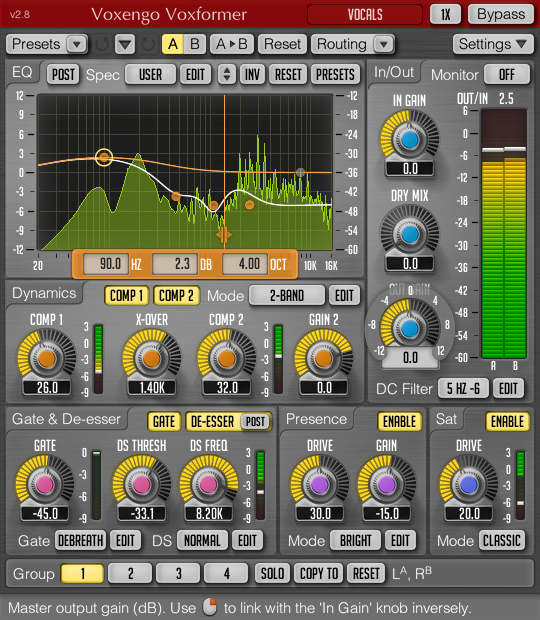
Whenever you apply a preset or change a parameter you can listen to the changes in your audio section by playing a loop in real time on the EDIUS timeline. That way you can optimize your sound in real time.
If you want to edit your audio professionally Voxengo Voxformer plugin for EDIUS is highly recommended.
Acon Digital Restoration Suite – VST audio filters
 When shooting a video sequence you cannot always avoid recording some noise. Sometimes you might find out only in the editing suite that there are some disturbing audio signals in your footage. To fix this in the postproduction is usually very time consuming and often does not lead to the hoped for results. How often do you have failed to remove noise like hiss, wind noise or broadband noise from important scenes? With ACON Digital Restauration Suite for EDIUS it is possible to reduce different kind of noise in less time and good quality.
Great efforts have been put into preserving as much of the
original signal and it’s character as possible during the noise reduction process.
The ACON Digital Restauration Suite for EDIUS consists of four audio restoration plug-ins that can be combined individually:
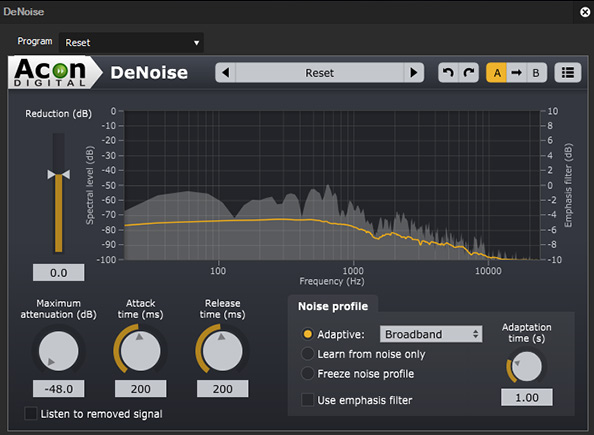
DeNoise is designed to reduce stationary noise such as broadband noise, hiss, wind noise, buzz and camera noise.
You can freeze the noise profile anytime in order to perform the actual noise reduction.
DeHum targets hum and buzz typically introduced by poorly grounded electrical equipment, but also other tonal noise sources like electrical motor noise.
The integrated monitoring function allows you to only reply the audio signal that has to be removed. Using this function parameters can be set precisely.

DeClick is designed to remove impulsive noise.
Impulsive noise such as clicks and crackle are frequently encountered on LP and 78 RPM records, but also occur in digital recordings due to drop-outs or distorted data packets. Due to their metal sound these distortions can be very annoying.
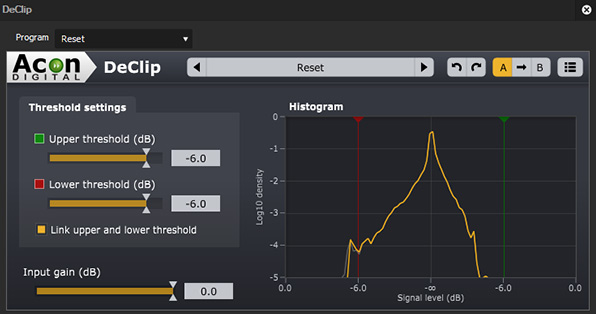
DeClip restores audio recordings distorted by analog or digital clipping
Experts recommend operating a camera manually instead of relying on automatic functions.
This avoids disturbances regarding the volume, which occur when the automatic recording level control tries to set the level of an air condition in the background to the same level of the spoken words of an interviewee.
But when setting the recording level manually clipping can occur. This happens during recording when the recording level is too high and the highest peaks cannot be correctly recorded.
DeClip substitutes such distorted peaks with an estimation of the signal curve.

Demo audio files
Click here to find audio samples before and after being edited with Acon Digital Restoration Suite.
Conclusion
ACON Digital Restauration Suite for EDIUS can be used perfectly in combination with Voxengo Voxformer. It allows you to have best audio quality for your EDIUS productions – for a small price.
Tip: ACON Digital Restauration Suite for EDIUS is the optimal solution for users new in audio editing as well as a reasonably priced alternative for former users of ReduNoise, a 32-bit application which cannot be integrated in EDIUS 8 any longer. ACONoffersbetter performance and more options to improve your audio for a reasonable price.
Acon DeVerberate – Reverb Reduction Plug-in
 The balance between direct sound and reverberation is essential for the acoustic quality of audio recordings. DeVerberate is a reverb reduction plug-in that can attenuate or boost the reverberation that is already present in recorded material. The novel real-time algorithm works equally well with mono as with stereo recordings and splits the incoming audio into an estimation of the direct sound and the reverberated sound which can then be recombined freely. The improvement process can be monitored visually using the spectral representations of the input and output signal as well as of the estimated reverberation.
Use Cases
- Attenuate reverberation in existing recordings
- Change the perceived distance in a mix by changing the balance between the direct sound and the reverberation
- Improve dialog and location sound
- Forensic specialists can improve speech intelligibility
- Boost the natural reverberation in existing recordings
Features
- Separate adjustments of the direct sound and the reverberation levels
- Manual adjustment of the decay time of the original reverberation
- Frequency spectrum representation of the following signals:
- Input signal
- Output signal
- Estimated reverberation
- Frequency emphasis filter for the the reduction level
- High and low shelving filters with variable slopes (-3 to -96 dB/ octave)
- High and low peak filters with adjustable bandwidth (0.1 to 3.0 octaves)
- Graphical representation of frequency response
- Editing of filter settings through handles in the freqency response curve

Click here to listen to audio samples.